Creating a New Project
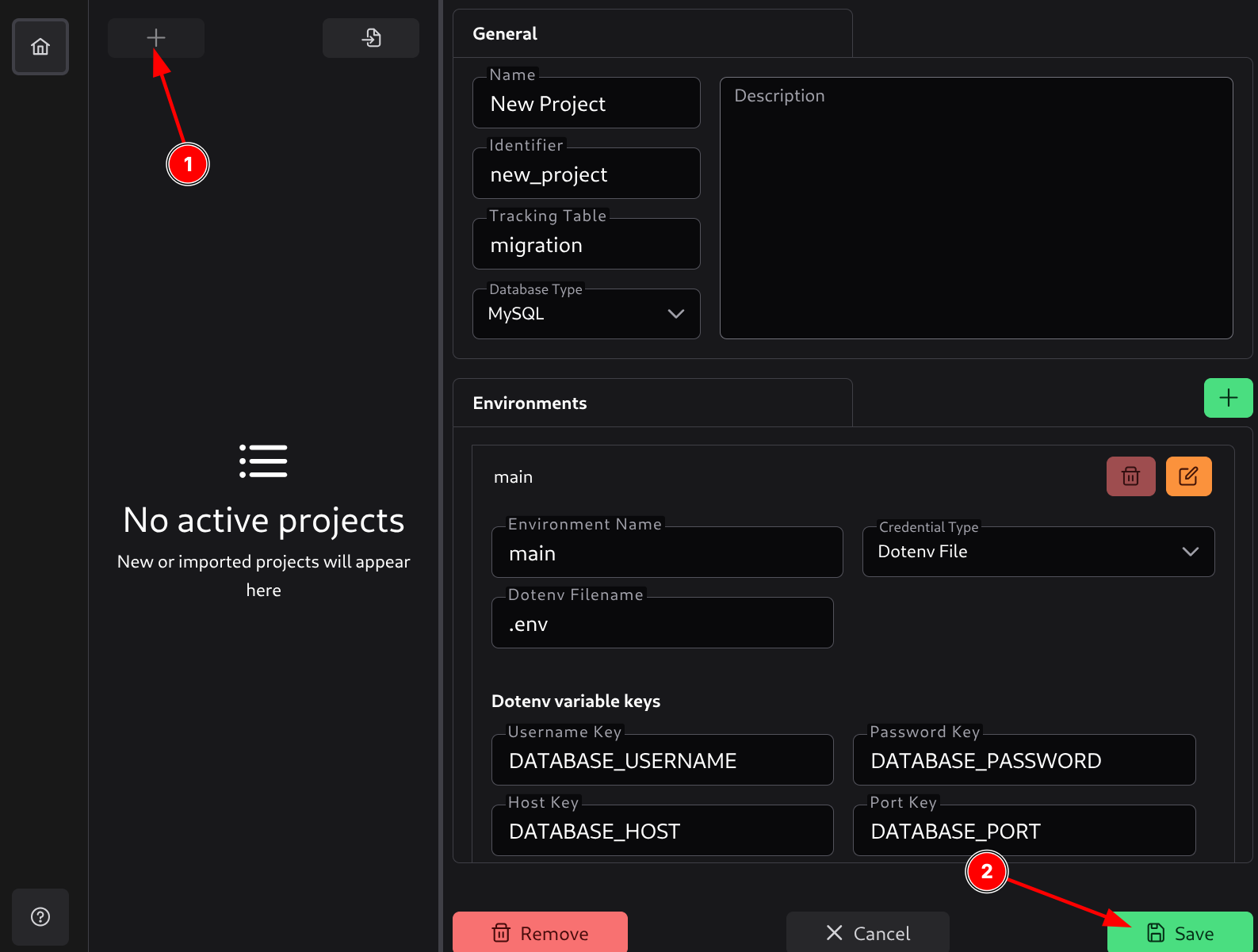
To create a new project, click on the plus sign (1). This will display a form where you can enter the project details.
The General section contains the basic metadata needed to set up a new project.
- Name - Human-readable name of the project.
- Identifier - A unique slug/key used internally to reference the project. Common pattern: lowercase with hyphens, no spaces (e.g.,
my-awesome-project). This identifier will be used in the database to track migrations for this project. - Tracking Table - Name of the table where SQL Migration Tool will track which migrations have been applied.
- Database Type - Choose the database engine your project will use. SQL Migration Tool currently supports MySQL, PostgreSQL, and Microsoft SQL Server.
- Description - Optional text describing the purpose of this project. Use this field to briefly outline the system or migration tasks the project handles.
Environments
Each project can have one or more environments (e.g., local, development, staging, production).
An environment defines how SQL Migration Tool connects to your database.
Each environment has a name and a credential type:
- Environment name - A human-readable identifier for the environment.
- Credential type - Defines how the application will retrieve the database connection details.
Fields in the environments depend on the chosen credential type.
Direct Credentials
Direct credentials means you enter the database connection details directly into the application. These credentials (also called hardcoded credentials) will be committed to the configuration file. It is not recommended to use this method for production environments.
Fields:
- Username - Database username.
- Password - Database password.
- Host - Database host address.
- Database Name - Name of the database to connect to.
- Port - Database port.
- Use SSL - Whether to use an SSL connection to the database.
- CA File Path - Path to the SSL CA file, if applicable.
- Certificate File Path - Path to the SSL certificate file, if applicable.
- Key File Path - Path to the SSL key file, if applicable.
- Verify Peer Certificate - Whether to verify the peer certificate.
AWS Credentials
AWS credentials means the application will retrieve database connection details from AWS Secrets Manager. This is a secure way to store and retrieve database credentials.
Fields:
- Path - The full path to the secret in AWS Secrets Manager.
- Region - The AWS region where the secret is stored.
- Secret keys - Mapping of secret keys to database connection fields. You can specify which key in the secret corresponds to which database field (host, port, database name, username, password).
- Username Key - Key in the secret that contains the database username.
- Password Key - Key in the secret that contains the database password.
- Host Key - Key in the secret that contains the database host.
- Database Name Key - Key in the secret that contains the database name.
- Port Key - Key in the secret that contains the database port.
- Use SSL - Whether to use an SSL connection to the database.
- CA File Path - Path to the SSL CA file, if applicable.
- Certificate File Path - Path to the SSL certificate file, if applicable.
- Key File Path - Path to the SSL key file, if applicable.
- Verify Peer Certificate - Whether to verify the peer certificate.
Dotenv Credentials
Dotenv credentials means the application will retrieve database connection details from a .env file. This is a secure way to store and retrieve database credentials without hardcoding them into the configuration file, as this file is usually excluded from version control.
Fields:
- Dotenv File Name - Name of the
.envfile (e.g.,.env,.env.production). - Dotenv variable keys - Mapping of dotenv variable keys to database connection fields. You can specify which variable in the
.envfile corresponds to which database field (host, port, database name, username, password).- Username Variable Key - Variable in the
.envfile that contains the database username. - Password Variable Key - Variable in the
.envfile that contains the database password. - Host Variable Key - Variable in the
.envfile that contains the database host. - Database Name Variable Key - Variable in the
.envfile that contains the database name. - Port Variable Key - Variable in the
.envfile that contains the database port. - Use SSL Variable Key - Variable in the
.envfile that indicates whether to use an SSL connection to the database. Valuestrue,yes,on, and1are considered true. - SSL CA File Path Variable Key - Variable in the
.envfile that contains the path to the SSL CA file. - SSL Certificate File Path Variable Key - Variable in the
.envfile that contains the path to the SSL certificate file. - SSL Key File Path Variable Key - Variable in the
.envfile that contains the path to the SSL key file. - SSL Verify Peer Certificate Variable Key - Variable in the
.envfile that indicates whether to verify the peer certificate. Valuestrue,yes,on, and1are considered true.
- Username Variable Key - Variable in the
Saving a Project
Once you click the Save button (2), a dialog will open where you can choose the location to save the project’s configuration.yml file. This file is the entry point to your project and will be used to reference these settings.
At the time of creation, SQL Migration Tool will create the following structure:
.
├── configuration.yml - Project configuration file
├── README.md - Project README file
├── .gitignore - Git ignore file to ignore files from version control
├── migrations - Migrations folder
│   ├── down - Down migrations folder
│   │   ├── .gitkeep - Placeholder file to keep the folder in version control
│   └── up - Up migrations folder
│       ├── .gitkeep - Placeholder file to keep the folder in version control
├── package.json - Node.js package file, used by CLI tool and in CI/CD
└── scripts - Scripts folder
    └── .gitkeep - Placeholder file to keep the folder in version control
If one of the environments has dotenv credentials, additional .env example files will be created.